
Related Products
AGV Programming: How to Configure Routes, Tasks, and Equipment Interfaces
Adding a drop-off point in AGV configuration software and programming an AGV to transfer loads automatically to a conveyor involve different kinds of work.
What Does AGV Programming Involve? · Does AGV Programming Require Coding? · How to Program an AGV
Adding a drop-off point in AGV configuration software and programming an AGV to transfer loads automatically to a conveyor involve different kinds of work. The first may only require changes to the map and transport task. The second also involves vehicle positioning, equipment-ready signals, load-transfer actions, and exception handling.
Both fall under AGV programming. Whether the work calls for graphical configuration software, PLC programming, or custom development depends on the AGV control system and the requirements for integrating with equipment on site.
What Does AGV Programming Involve?
AGV programming mainly involves configuring travel routes, workstation locations, load-handling actions, and the conditions under which tasks are carried out.
For a lifting AGV, for example, engineers set the pickup and drop-off points and the route between them, then configure the lifting and lowering actions at the relevant workstations.
The onboard controller executes driving and load-handling commands. If a facility operates multiple AGVs, a dispatch system also assigns transport tasks and coordinates vehicle movements.
Does AGV Programming Require Coding?
Not necessarily.
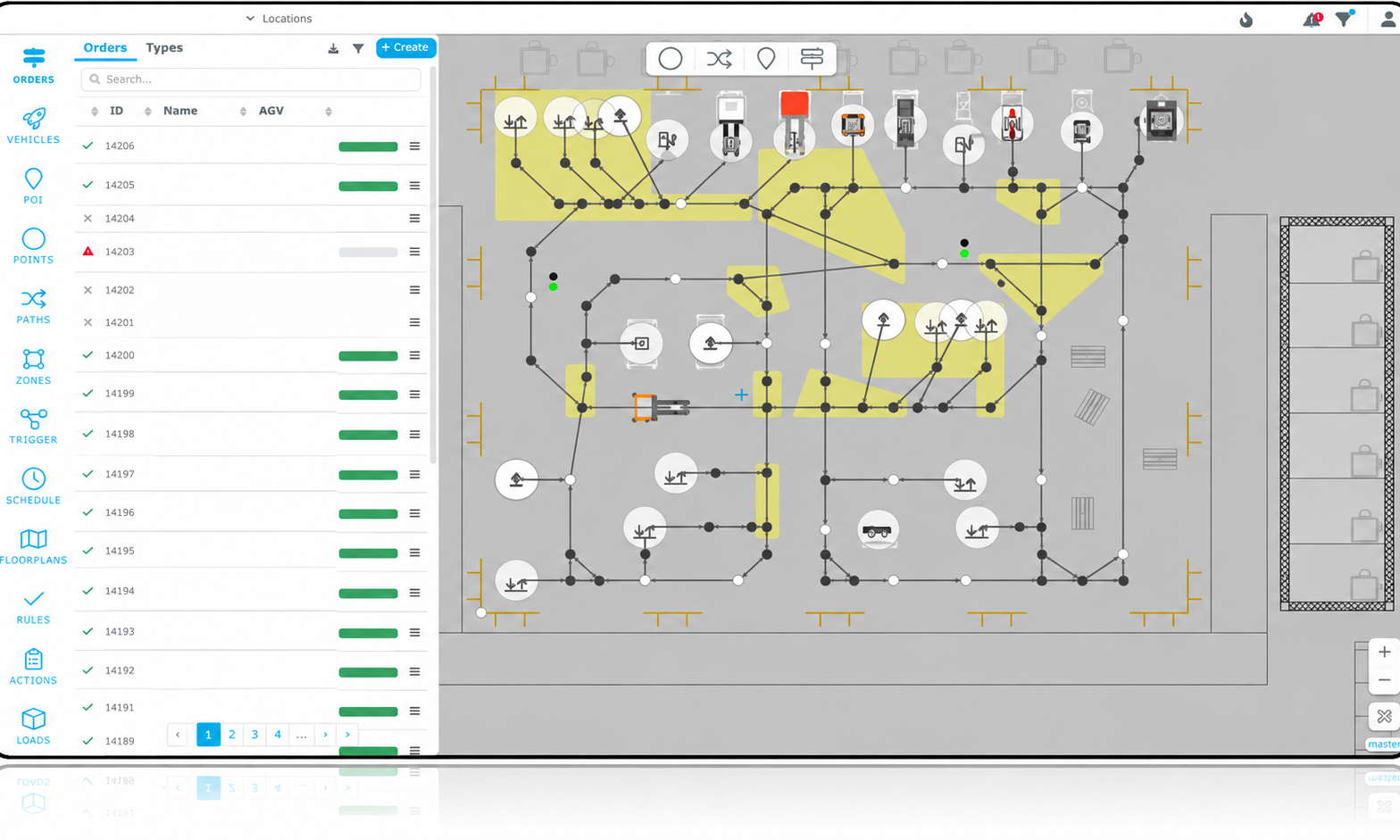
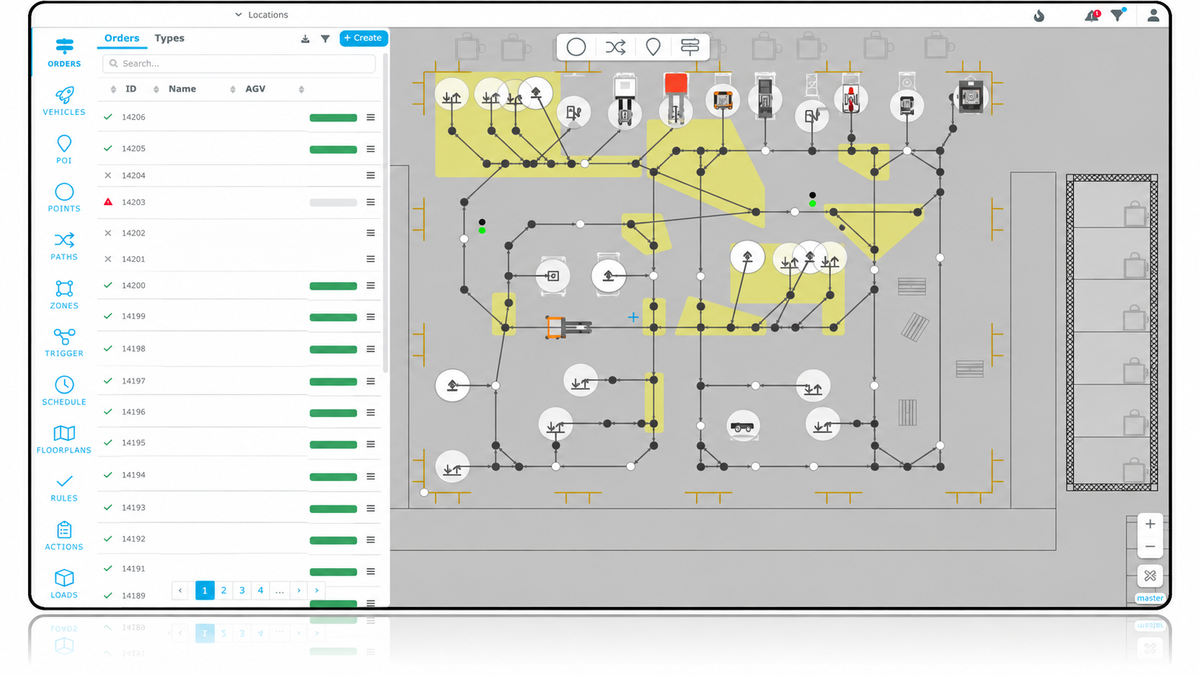
Many industrial AGVs support graphical configuration. Engineers can draw routes, add workstations, and set the actions a vehicle performs when it reaches a designated location. Changing a route or adding a transport task generally does not require modifying the underlying control program.
For example, BlueBotics ANT lab can be used to create maps, configure routes, and set vehicle actions. Daifuku CartTools is used to configure commands an AGV executes at specific locations.
When an AGV needs to exchange loads automatically with production equipment, the project may also involve PLC programming and communications interface development.
| Programming Method | Main Use | Is Coding Required? |
|---|---|---|
| Graphical configuration software | Set up maps, routes, workstations, and vehicle actions | Usually not |
| Manufacturer-specific programming tools | Configure vehicle commands, task sequences, and operating parameters | Depends on the software |
| PLC programming | Manage equipment handoff signals, action conditions, and control logic | Usually yes |
| Python, C++, and other software development | Develop custom control functions, communications interfaces, or robot software | Yes |
Python and C++ are software development languages, while PLCs are mainly used for industrial equipment control. Some AGV software development projects also use the Robot Operating System (ROS) framework.
Adding a standard transport station might only call for a software configuration change. If the new station has an automated conveyor or other equipment that must operate in coordination with the AGV, its control program may need to be extended.
How to Program an AGV
Consider an AGV that carries a material rack from point A in a warehouse to point B on a production line. Engineers need to configure its route, pickup and drop-off actions, and task triggers.
1. Set Pickup Points and Travel Routes
First, identify where the vehicle will pick up and drop off the load, along with the aisles it will use.
For AGVs using SLAM or similar map-based navigation, engineers can create or import a facility map and configure travel routes in the software.
Routes are often built from nodes and connecting links. Pickup points, drop-off points, turns, and intersections can all be represented by nodes.
For example, point A in the warehouse becomes a pickup station, point B on the production line becomes a drop-off station, and a route is planned between the two.
Magnetic tape-guided AGVs, by contrast, follow tape installed on the floor. Changing their routes may require changing the tape layout.
For more on how these navigation methods work, see our AGV Navigation System.
2. Configure Pickup and Drop-Off Actions
Once the route is set, the next step is to define what the vehicle does at each station.
A lifting AGV drives beneath a material rack at the warehouse pickup point. Once it is correctly positioned and the pickup conditions are met, the lifting mechanism raises the rack and the vehicle starts its trip.
At the production line, the AGV stops at the designated position and lowers the rack into place.
A forklift AGV requires commands for fork movement and pallet pickup and placement. A roller-top AGV, meanwhile, needs controls for starting and stopping its rollers and detecting whether the load is in position.
3. Set Task Triggers
A transport task can be started by an employee through an operator terminal or issued automatically by an upstream system.
For example, when a production line needs more raw materials, an operator can call an AGV from the terminal. If the line is connected to a manufacturing execution system (MES), the MES can send a transport request to the AGV dispatch system based on material demand.
4. Configure Exception Handling
On the factory floor, a pickup point may be empty or the production line may not be ready to receive a load.
If an AGV reaches a pickup point and does not detect the material rack, it should stop the corresponding pickup action and report an exception.
If the drop-off station is occupied, the vehicle can wait until the station is ready or accept another task from the dispatch system, depending on how the system is configured.
How AGVs Integrate with PLCs, WMS, and MES
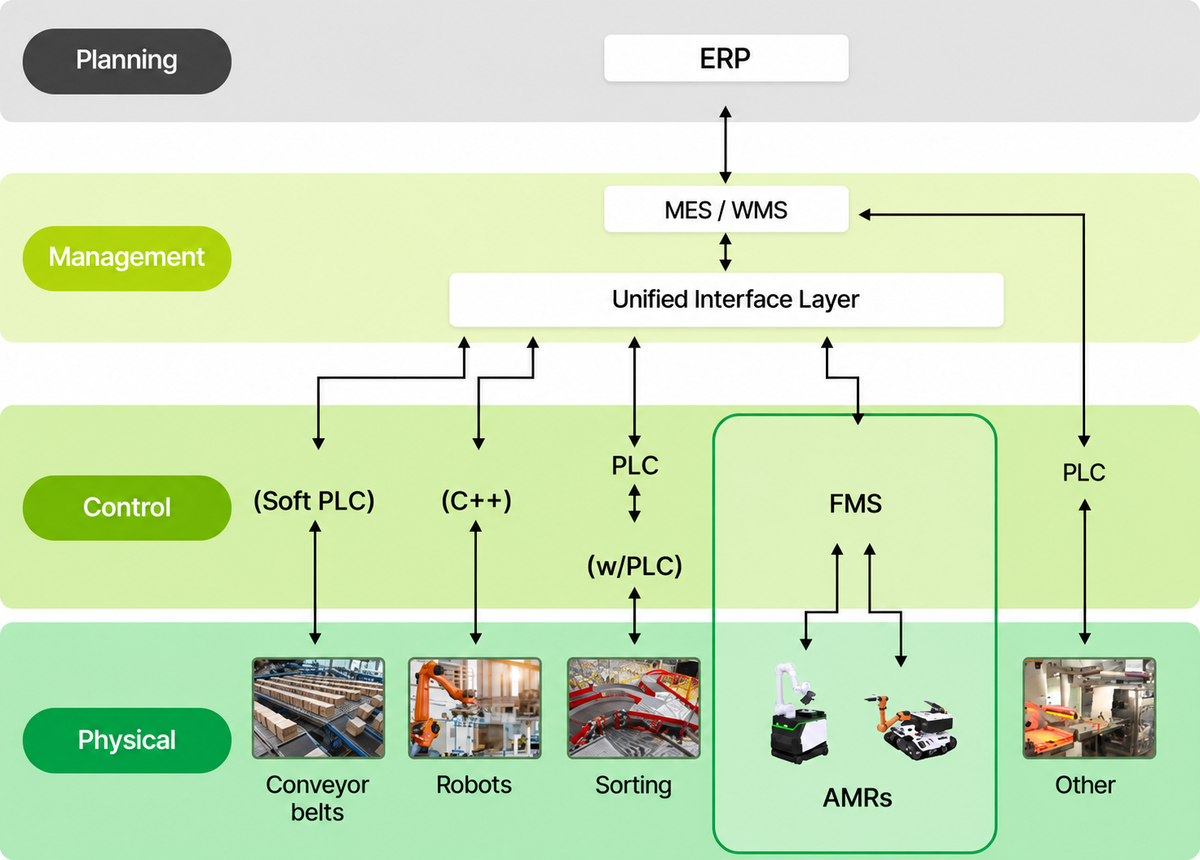
In automated factories, AGVs often need to exchange information with warehouse management systems, production equipment, and on-site controllers.
A warehouse management system (WMS) manages warehouse operations and inventory information, while an MES handles production execution information. The AGV dispatch system receives transport requests and assigns them to vehicles.
Programmable logic controllers (PLCs) commonly control on-site equipment such as conveyors, automatic doors, and lifts.
Consider a roller-top AGV delivering a load to an automated conveyor.
When the vehicle arrives, it must confirm that it is correctly positioned and check whether the conveyor is ready to receive the load.
If the conveyor is still handling another load, the AGV must wait.
Once the conveyor sends a ready signal and all transfer conditions are satisfied, the AGV and conveyor activate their roller mechanisms to transfer the load. Sensors confirm the transfer status, and the system updates the transport task.
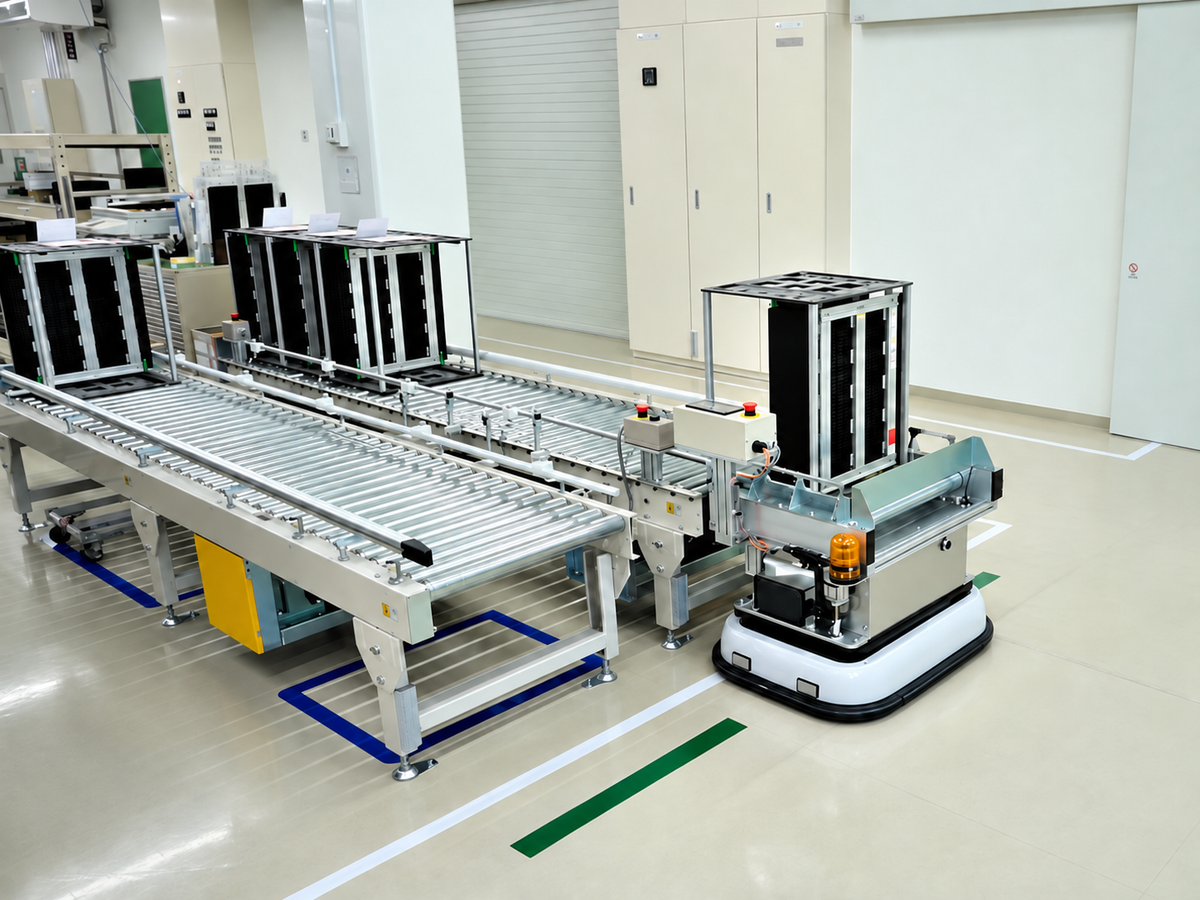
These signals can be exchanged through digital I/O or industrial communication protocols. Modbus TCP and OPC UA are among the possible options, depending on the vehicle controller and equipment interfaces.
When multiple AGVs operate together, vehicle assignment, intersection traffic, and charging also need to be coordinated. These functions are generally handled by an AGV Fleet Management System.
Testing an AGV Program Before Deployment
After configuration, engineers need to test the AGV’s routes, load-handling actions, and equipment handoffs on site.
Route and Load-Handling Tests
Start by running the AGV along its planned route. Check whether it can pass through turns and intersections and stop accurately at pickup and drop-off points.
Next, test lifting, lowering, and load placement. At stations that require precise positioning, repeat the tests to check whether the vehicle stops consistently.
For forklift AGVs, verify fork movements and pallet storage and retrieval. For roller-top AGVs, confirm that loads transfer properly to the receiving equipment.
Equipment Handoffs and Exception Handling
Under normal operating conditions, the AGV should complete handoffs in the configured signal sequence.
Testing should also cover occupied stations, missing loads, and communication faults.
For example, send an AGV to a conveyor station that is temporarily unable to receive a load. Verify that the vehicle waits as configured and resumes the handoff when the required conditions are met.
If a fault occurs during transport, check task suspension, fault reporting, and recovery. For systems connected to WMS or MES, the recorded load location and task status must also remain accurate after an interruption.
Multi-Vehicle Operation and Safety Functions
When several AGVs share the same aisles, test traffic coordination at intersections, passing areas, and workstations.
Safety scanning, emergency stops, and safety interlocks should be validated according to the equipment’s safety design.
Before full production use, the system should also undergo continuous-operation tests to assess vehicle performance under normal and peak transport demand.
How to Modify AGV Routes and Tasks
A new production line or a change to the warehouse layout may require updates to existing AGV routes.
For example, a factory adds a material receiving station next to an existing production line and wants its AGVs to deliver to the new location.
If the vehicles support software-based map configuration, engineers can add the drop-off point, plan a route to the new station, and update the relevant transport tasks.
If the new station uses the same material rack and handling method, the changes are generally limited to routes, stopping positions, and task configuration.
If an automated conveyor is installed at the new station, the AGV will also need to exchange control signals with that equipment. This may involve changes to PLC interfaces and programs.
For AGVs guided by magnetic tape, magnetic markers, or other physical guidance features, route changes may also require modifications on the factory floor.
After changes are made, the affected load-handling actions, equipment handoffs, and safety functions should be tested again.
Coolyne offers AGV material-handling and system integration solutions. Based on a facility’s transport tasks, layout, and equipment interfaces, we can help plan an AGV system and its control configuration. Contact us to discuss your AGV automation project.
Next Review
Move from article research to a scoped feasibility review.
Use the related products and solution paths below, then send your workflow and layout for a quick engineering review.
Related Solutions
Engineering Review